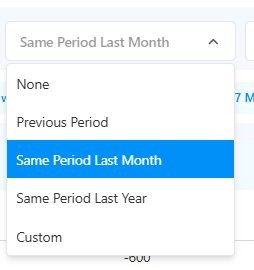
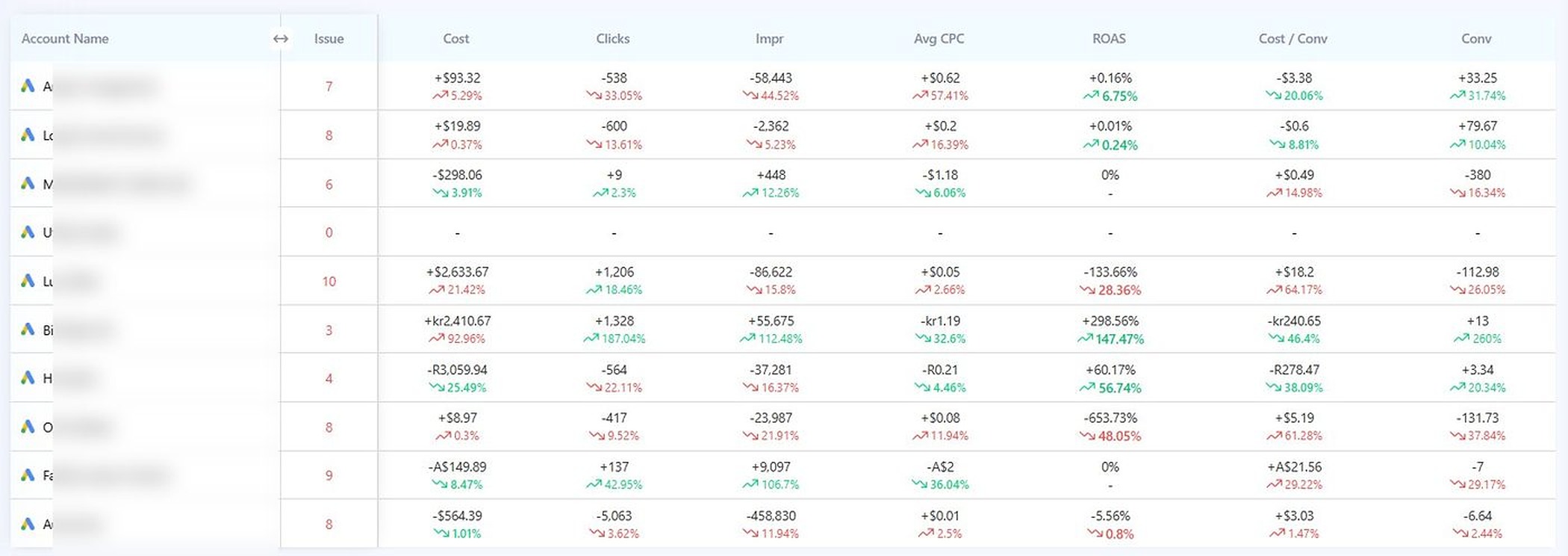
No more pulling reports for each client. Switch periods at the top, the entire grid recomputes. Hover (or tap) to zoom in on the screenshot below.
Cost, clicks, impressions, average CPC, ROAS, cost-per-conversion, total conversions — each one with the absolute change and percentage delta vs. your selected period. Green when winning, red when losing. Sort by any column.
To answer "which of my 30 client accounts had a bad week" in Google Ads, you'd open each account, set a comparison period, scan a chart, write down what you saw, then move to the next one. That's 30 tabs, 30 minutes, 30 chances to miss something.
The Adtunez period comparison view loads all of them at once. Cost up 21% on one account, ROAS down 28% on another, conversions up 79 on a third — you see every signal in 30 seconds. The accounts that need attention surface themselves.
Switch comparison windows from a single dropdown at the top of the dashboard. The whole grid recomputes instantly.
Compare to the same number of days immediately before. If you're viewing "last 7 days," it compares to the 7 days before that. Useful for week-over-week trend tracking.
Compare to the same date range one month ago. Mar 1–15 vs Feb 1–15. Catches monthly-cycle issues like billing dates, payday traffic, or month-end pushes.
Compare to the exact same date range, 12 months ago. The only honest comparison for seasonal businesses — travel, retail, fitness, education. Tells you if growth is real or just a season.
Pick any two date ranges to compare. Pre vs. post a campaign launch. Before vs. after a budget reallocation. Two specific weeks for a board report. Total flexibility.
In-app
Single dropdown at the top of the dashboard. Click, pick, every metric recomputes.
Each metric in the period comparison view is paired with both the absolute change and percentage delta — so spikes that look small in % can still surface when the dollar move is large (and vice-versa).
Total spend for the period. Up means more invested; pair with conv to see if it paid off. Sudden cost jumps usually signal a stuck budget pacing issue or a runaway PMax campaign.
Total clicks. Up with cost flat means CPC fell (good). Down with cost up means CPC rose, often a sign of weakening Quality Score or bid creep.
Auction reach. Big drops can mean budget caps, disapproved ads, or losing impression share to a new competitor.
Cost per click. Down usually means Quality Score improved or competition softened. Up the opposite.
Return on ad spend. The most reliable single signal that an account is winning or losing. A 28% drop in ROAS across multiple accounts in the same week is the kind of thing this view exists to surface.
Effective CPA. Pair with ROAS for the full picture. Rising CPA on rising ROAS = customers buying more per visit. Rising CPA on flat ROAS = pricing pressure.
Total converting actions. The bottom-line metric. Always read alongside the other six — a 79-conv jump on flat ROAS means every other lever is working.
Open Adtunez, set comparison to "Same Period Last Month," and 30 client accounts review themselves in 60 seconds. The ones that moved show up red or green. The ones to call about, you call.
Set comparison to "Same Period Last Year." Take a screenshot. That's your portfolio-level board slide. Done. Especially powerful for seasonal businesses where MoM hides the real story.
Pick two custom date ranges — before launch and after. Compare. Every metric, every account, side by side. The kind of analysis that used to take a junior analyst half a day, done in two clicks.
The period comparison view is included on every Adtunez plan. Run a free audit or start a 15-day trial — your first comparison view loads within 10 minutes of connecting.